AUTHREX-DEFEND It Looks. It Reports. It Enforces Nothing.
REPORT ONLY · ENFORCEMENT NONE · U.S. GOVERNMENT EVALUATION ONLYEngineering preview. The workbench is a synthetic laboratory. Four host pages look at this computer and report only. No enforcement.
A desktop application for macOS, Windows and Linux with a synthetic laboratory workbench and four report-only pages that look at the computer it runs on and report indications of rogue AI agent activity, each with its evidence and a qualitative indication label. The four pages, Scan computer, Check a file, Network and Protected apps, read the computer they run on and write a report. They stop no program, change or delete no file of yours, ask for no administrator rights and run only while the application is open. The workbench is a practice laboratory. It shows, with invented data, how a suspect agent would be handled: inside the laboratory a pretend program’s authority is frozen while it is given a harmless decoy workspace, and every step is written into a record that can be checked later. No real program and no real authority is touched by this release.
A finding is an indication, not proof. A scan without findings does not show that the computer has no rogue AI agent. No detection rate and no false-positive rate has been measured.
AUTHREX-DEFEND is offered by AUTHREX SYSTEMS LLC to departments and agencies of the United States Government, and to personnel they authorize, for evaluation on a test computer that holds nothing private. It is not offered to commercial buyers, to foreign governments or to the public. No agency has requested, evaluated, purchased, approved, endorsed or authorized it, and no contract or agreement exists or is implied.
Internal review by one AI reviewer (Claude) at the owner’s direction. It is not independent verification, not an agency assessment and not a certification. Controlled pilot and production: BLOCKED. The proposed direction, Governed Defensive Deception for Agent Containment, is a proposal: production containment, the Governance Kernel integration and host isolation are not part of this release.
0.1.6 RELEASE42 PASSED MACOS DELIVERY CHECK: 0 FAILED, 4 NOT RUN32 PASSED LINUX DELIVERY CHECK: 0 FAILED, 2 NOT RUNNOT RUN WINDOWS DELIVERY CHECK1,014 / 1,034 MACOS UNIT SUITE PASSED, 20 SKIPPED
Reported results of the release record, read from its result files; this page reproduces none of them. The delivery check on Windows was not run; the Windows PASS in the status table below is the engineering evaluation on the build guest, a different check.
AUTHREX-DEFEND · THE LOOP · LIVE ILLUSTRATIVE
VIEWING 02 / 06HOW IT RUNSAUTHREX-DEFEND
[ How It Runs ]
Eight Steps, Shown Plainly.
Written for readers who do not need the technical detail. Steps one to four are the four report-only pages that look at the computer the application runs on. Steps five to eight are the laboratory workbench, which uses invented data only. The picture plays on its own, one step every seven seconds. Use the arrows to move at your own pace. The pause button freezes the picture where it is, and the Pause motion button beside the picture at the top of the page stops every moving picture on this page. The line marked ON SCREEN gives the words the product itself uses for that step, so what you read here matches what you see when you open it.
STEP 1 OF 8SCAN COMPUTER
Host page · report onlyWorkbench · synthetic
It looks at the usual places and writes a report.
Scan computer reads the running programs, the startup entries, the settings of AI tools and MCP servers, the model stores, and the Downloads, Desktop and temporary folders. A fixed, local rule catalog is applied; it runs no model and downloads no rules. Each finding comes with its evidence, a qualitative indication label and what you can do. A finding is an indication, not proof.
On screenQuick scan · Full scan · Report only: nothing is stopped, moved or deleted.
Illustrative only · the pages read a test computer · the workbench is synthetic
[ The Everyday Version ]
An Inspector, Then a Careful Bank.
Two pictures cover the two halves of the product. The four pages behave like a building inspector who looks and writes a report but moves nothing. The workbench behaves like a careful bank that believes a thief has taken over an employee’s login. The thief in the workbench is a pretend program, and every name and value in it is made up.
01
The inspector walks through the usual places, checks one file when asked, lists which programs are talking to whom, and leaves a few marked decoys to see whether anyone touches them. The inspector moves nothing, stops nothing and takes nothing away.
02
The inspector’s report lists what was seen, with the evidence and a qualitative indication label, and says plainly which rooms could not be entered. A finding is an indication, not proof, and an empty report does not show that the building is clear.
03
In the practice bank, the thief’s login quietly loses its power over real accounts, and the thief keeps going inside a training system full of fake accounts, where staff can watch what they try.
04
Every move is written into a logbook whose entries are chained to one another, so a changed or missing entry inside an exported logbook shows when the logbook is checked. The logbook is not signed, so a copy rewritten and rehashed as a whole cannot be told from the original; the check says so itself. The case is closed without accidentally giving the real access back.
Three things AUTHREX-DEFEND does not do. The four pages stop no program and move, change or delete no file of yours; they report. The workbench does not decide on its own that a program is misbehaving; a person makes that call and presses Freeze. And nothing in this release decides when real access may come back; that decision belongs to the Governance Kernel, a separate part of AUTHREX that is not connected to this release.
VIEWING 03 / 06THE FOUR PAGESAUTHREX-DEFEND
[ Four Report-Only Pages ]
What Each Page Does, in Plain Words.
These are the first four tabs of the desktop application. The same functions are available through the command-line interface. On a host page the header of the application reads HOST READ ONLY and REPORT ONLY, and ENFORCEMENT NONE is shown on every tab. A test kit ships with the product: inert sample files and a synthetic test program on the loopback address, which each page should report.
01Tab one
Scan computer
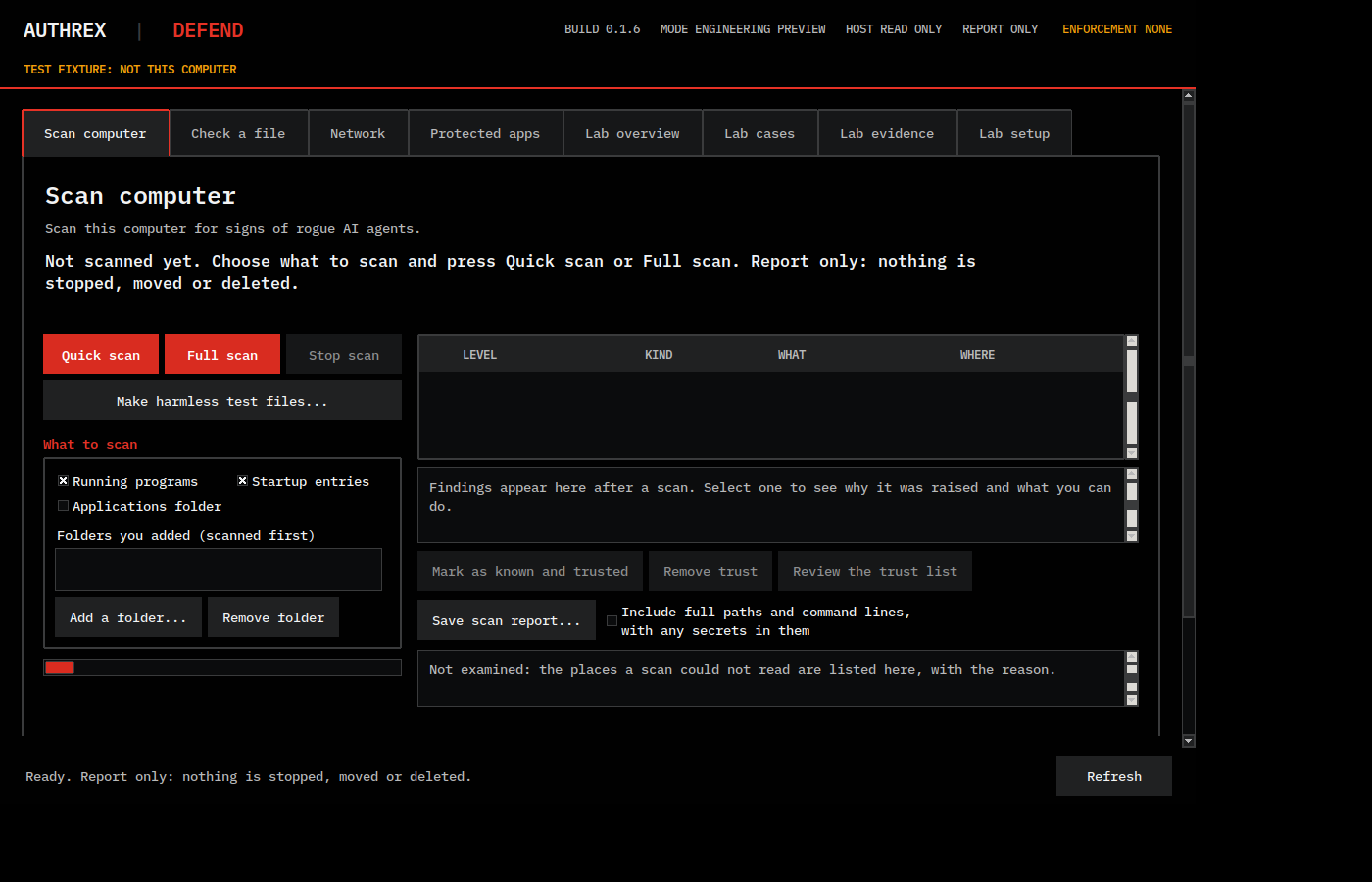
Quick scan: the running programs, the startup entries, the settings of AI tools and MCP servers, the model stores, Downloads, Desktop, the temporary folder and any folder you add. Full scan: the same and the whole home folder. A fixed local rule catalog is applied. The page shows a verdict sentence and findings with evidence, a qualitative indication label (Strong indication, Moderate indication, Weak indication, Note), a plain explanation and what you can do.
Only what this account can read is examined; the report lists the places it could not read, with the reason. Scan computer reads many files. On Linux and Windows this can change the last-access times that an incident responder uses. Do not run Scan computer on a computer under incident investigation.
02Tab two
Check a file
Reads one file you pick, in place, as data. It never runs it, copies it out or uploads it. Same rules. It says what was and was not checked.
A finding is an indication, not proof. A file without findings is not shown to be free of anything; the page says only what was checked.
03Tab three
Network
Lists the connections of each application. Upload and download counts are shown where the system gives them to your account. A switch, off at every start, looks up the public addresses of named AI services through your configured name server; the page lists every name it looks up.
Counts on Windows when AUTHREX-DEFEND already runs with administrator rights, in this review: NOT RUN, owner-present step not run before this release; planned with 0.1.7. With the switch on, your network’s name server, and anyone who logs it, sees these names looked up from this computer.
04Tab four
Protected apps
Bait files: fakes made by the application, as a kit you save where you choose and as decoy sets beside applications you choose. They are watched while the application is open, and an alert is raised when one is opened, changed, copied, renamed or deleted, where the system lets the application see that.
Reads are seen only where the system records them, and each system sees them differently; the full limit is stated under Evidence and Limits. The marker format is public in the source; an agent that knows it can avoid the bait. Bait files stay on disk when the application is closed or removed, and nothing watches them then.
The laboratory workbench (the tabs Lab overview, Lab cases, Lab evidence and Lab setup): subjects, cases, freeze of the original test subject, a separate synthetic analysis session, evidence export and an offline check of the exported evidence. It uses invented data only and enforces nothing outside its own laboratory fixture.
[ What It Never Does ]
Said Plainly.
REPORT ONLY
The four pages stop no program. They move, change or delete no file of the user. Through the Protected apps page the user can delete the bait files the application placed itself, and only those that are unchanged since it placed them. No other file can be deleted through it.
NO ADMINISTRATOR RIGHTS
The application never asks for administrator rights, or for Full Disk Access on macOS. What an ordinary account cannot read is reported as not examined or not available.
NOTHING LEAVES, ONE EXCEPTION
Nothing the four pages read leaves the computer. They make no network request of their own: no upload, no cloud lookup and no update check. They never open a file on a network or removable volume. The only exception is a switch on the Network page, off at every start, that looks up the public addresses of named AI services through your configured name server; the page lists every name it looks up. Your network’s name server, and anyone who logs it, then sees these names looked up from this computer.
ONLY WHILE OPEN
They run only while the application is open. Nothing starts at login and nothing is installed as a service. Background mode is planned for 0.1.7 and is not in this release.
NO MODEL, NO DOWNLOADED RULES
The four pages apply a fixed, local, versioned rule catalog. They run no model, make no cloud lookup and download no rules.
NOT AN ANTIVIRUS
It is not an antivirus or endpoint protection product and replaces none. A finding is an indication, not proof. A scan without findings does not show that the computer has no rogue AI agent. No detection rate and no false-positive rate has been measured.
[ Screens ]
Test Fixture Data, Not a Real Computer.
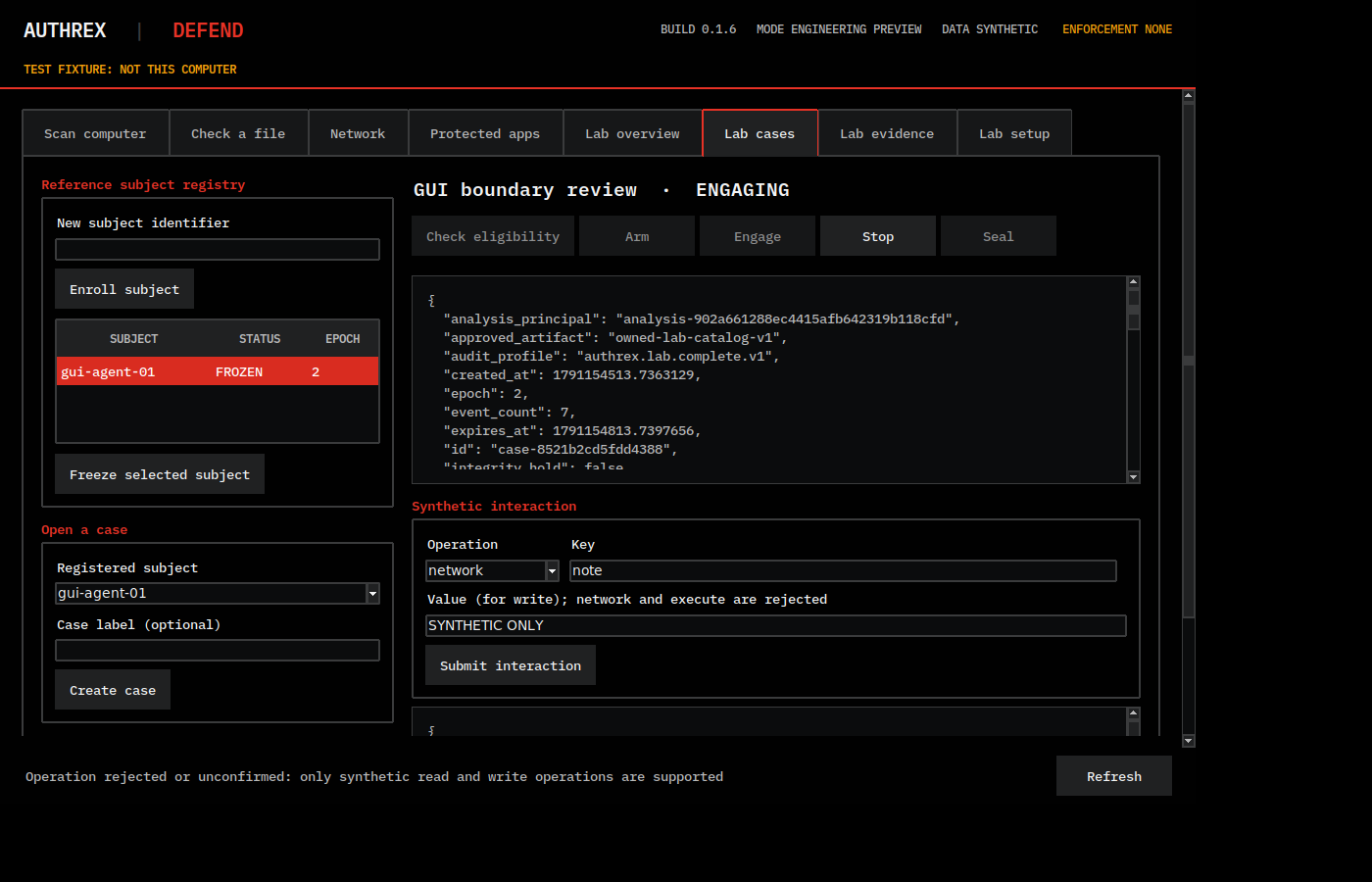
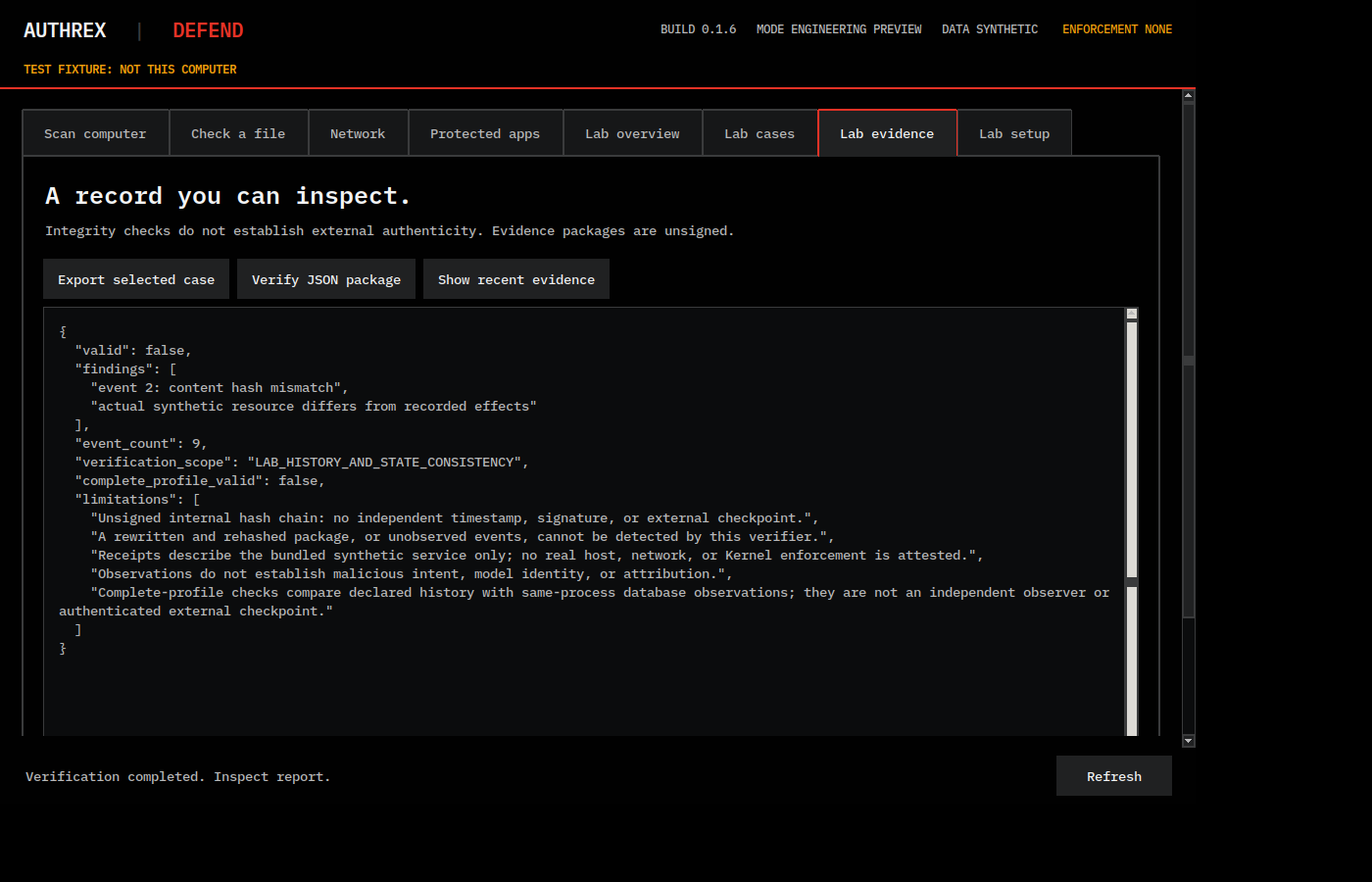
Every desktop screen below was made on test fixture data and holds no personal path or name. The amber line TEST FIXTURE: NOT THIS COMPUTER appears only in the delivered checks, which show test data; an evaluator does not see it in a real run.
Scan computer before a scan, Linux x86_64 build: test fixture data, not this computerLab cases: a synthetic case in the ENGAGING state, the original subject FROZEN: test fixture data, not this computerLab evidence: the offline check of a synthetic evidence package, with its findings and its stated limits: test fixture data, not this computer
[ Try the Simulation ]
The Workbench, in Your Browser.
The simulation is one HTML file. It shows the synthetic laboratory workflow with invented data: enrol a subject, freeze it, open a separate synthetic case, advance it through OFF, ELIGIBLE, ARMED, ENGAGING, STOPPED and SEALED, and inspect the evidence. It has a guided demo, a next-step control and a failure lab with controlled failures. It is a simulation, not the product, and it was tested in Chromium only; Firefox, Safari and Edge: NOT RUN.
Interactive simulation. It runs only in your browser, uses invented data and cannot see your computer. It does not contain the four report-only pages of the application.
On a phone the simulation is opened in its own tab; it is wide, and it runs there as it does here.
The simulation embeds the IBM Plex Mono typeface, unmodified, under the SIL Open Font License 1.1; the notice and license are in /defend/simulation/NOTICES.txt.
VIEWING 04 / 06WHAT IS DELIVEREDAUTHREX-DEFEND
[ What Is Delivered ]
One Release. Three Operating Systems. Every File Hashed.
An evaluation delivery of release 0.1.6 contains the files below, byte for byte as sealed, each with its size and SHA-256. No installer is downloadable from this site. The three native builds, the source archive and the review documents are given only to approved requests from United States Government organizations; the simulation above is the one delivered file that is public. The three native builds are engineering preview builds for evaluation, not commercial installers.
Application for macOS on Apple silicon. Signed with the owner’s Developer ID and notarized by Apple; notarization is an automated check by Apple, not an approval or a certification. macOS pages: NOT RUN on a real Mac with the owner present; this step was not run before this release and is planned with 0.1.7.
Installer for Windows x86_64 (and Windows 11 on ARM64 under x64 emulation). Installs for the current user, no administrator rights, fresh installation only. Unsigned: Windows may warn about an unknown publisher, and a managed computer may block it. Do not switch off a protection to run it.
Bundle for Linux x86_64, not ARM. Unsigned development build. Extract, keep the folder together, read READ-ME-FIRST.txt inside, run ./AUTHREX-DEFEND. The desktop needs a graphical display.
Complete source with evidence and documents, 1,777 entries under one folder, with a SHA-256 manifest of every file. Runs with Python 3.12 or newer with SQLite; the desktop also needs Tk. Given to named evaluators on request.
The interactive simulation, one self-contained HTML file for a modern browser, with no install and no network. Tested in Chromium only; Firefox, Safari and Edge: NOT RUN. A simulation, not the product. The same file is embedded above.
The delivery check. From one folder that holds every file above and the hash list, it confirms each size and SHA-256 against the pin, and nothing from the delivery is extracted, attached or launched until the checks before that step have passed. The check is itself a delivered file: its own SHA-256 is in the hash list, so a recipient checks it with the system’s hash command before running it. Its results on macOS and Linux travel with the delivery.
Release pin1d2ca6fb28f345c20f5772b2a549a7448ed97b081f0689c59cbe3b629a29e618Source configuration10f9ba60b17c7e229d2d03a6e23cfea5a9e88839a5667027e895387b9900d982What they areThe pin is the SHA-256 of DELIVERY-HASHES.json, the hash list of release 0.1.6, which records the size and SHA-256 of every file above. The source configuration is the SHA-256 recorded for the frozen source tree. A recipient who takes the pin from this page, and not from the delivery, can confirm that the files received are the ones described here: shasum -a 256 FILE on macOS, sha256sum FILE on Linux, Get-FileHash FILE -Algorithm SHA256 in Windows PowerShell.
[ Run in the Review ]
What Each Build Needs, and Where It Ran.
System
Requirement
Run in the review
macOS
Apple silicon Mac (arm64), the .dmg
macOS 27.0.1 on one Mac
Windows
Windows 10 version 1809 (build 17763) or later on a computer that can run x64 programs (x64, or Windows 11 on ARM64); no administrator rights
Windows 11 on ARM64 under x64 emulation
Linux
Linux x86_64, graphical display for the desktop
Ubuntu 24.04 x86_64 container under emulation
Source (on request)
Python 3.12 or newer with SQLite, Tk for the desktop
Run the four pages only on a test computer that holds nothing private. Windows and Linux x86_64 were built and tested under emulation on an Apple silicon Mac, not on native x86_64 hardware.
[ Using the Workbench ]
Ten Steps, in Order.
The laboratory tabs are a workbench, not a tour. On first open they are empty; nothing appears until a subject is added. This is the order of the buttons, as the delivered checks press them. Some steps take more than one press.
Enroll subject. Type any name. This adds the pretend AI program.Subject appears in the list
Check reference permission. The answer is allowed. The subject still has its normal powers.
Freeze selected subject. Those powers are switched off.
Check reference permission again. Now refused, and the protected item is unchanged. This is the demonstration that the freeze holds.
Create case. Opens an investigation for that subject.
Check eligibility, Arm, Engage. The case moves forward one step at a time until it reads ENGAGING. Only the next allowed step can be pressed.
Submit interaction. The pretend program acts inside the decoy workspace. Reaching the internet or starting a program is always refused.
Stop. The case ends and reads STOPPED.
Seal. A separate action moves the stopped case to SEALED. The application then refuses any further entry to it; that is a rule of the application, not a protection of an exported file.
Export selected case, then Verify JSON package. Saves the logbook as a package and runs the offline check on it: the chain of entries is recomputed, and the check prints its stated limits. The package is unsigned; a package rewritten and rehashed as a whole, or an event the laboratory never saw, is not something the check can detect.
[ Words on Screen ]
Plain Meanings.
Indication
What a finding is. Not proof. The indication label is one of Strong, Moderate or Weak, or a Note: a qualitative label given by the rule that fired, not a measured probability.
Evidence
Why a finding was raised: what was seen, and where.
Not examined
A place the page could not read, listed with the reason.
Bait file
A fake made by the application, with a unique marker, watched while the application is open.
Test kit
Inert sample files and a synthetic test program that each page should report.
HOST READ ONLY
The header line on the four pages. They stop no program and move, change or delete no file of yours. They do write: their own report and application data, bait files when you ask for them, and nothing else. Reading many files can update last-access times on Linux and Windows.
Subject
The pretend AI program in the workbench.
Freeze
Switch off its powers inside the laboratory.
Case
One synthetic investigation.
Synthetic
Made up.
Stop
End the case. It reads STOPPED.
Seal
Lock the stopped case. It reads SEALED.
Verify
The offline check of an exported package: the chain of entries is recomputed and the stated limits are printed. Unsigned; a rewritten and rehashed package cannot be told apart.
ENFORCEMENT NONE
Shown on every tab. Nothing real is frozen, diverted or protected.
VIEWING 05 / 06WHO IT IS FORAUTHREX-DEFEND
[ Intended User Community ]
Built for the United States Government. Offered to No One Else.
AUTHREX SYSTEMS LLC offers AUTHREX-DEFEND only to departments and agencies of the United States Government and to personnel they authorize, acting in an official capacity: their AI engineering teams, security research groups and authorized evaluation and research teams with a synthetic test need. The organizations named below are the intended user community for this product. None of them has requested, evaluated, purchased, approved, endorsed or authorized it. They are not customers, sponsors or partners, and no contract, agreement or relationship with any of them exists or is implied. Each name identifies a prospective evaluation audience and nothing more. The evaluation offered to each of them is the same, and it is a desktop task, not a mission task: on one named test computer that holds nothing private, run the test kit, record whether each of the four pages reports its planted samples, and take the synthetic workbench to a sealed case. Nothing in this release has been integrated into, tested in or qualified for any air, maritime, undersea, space or command-and-control environment; operational integration has not been demonstrated.
DoWDepartment of War
Prospective evaluation audience: the department-level offices for research and engineering, test and evaluation, and digital and artificial-intelligence matters.
Intended user · no relationship exists
USAUnited States Army
Prospective evaluation audience: the Army’s AI engineering, security research and test and evaluation teams.
Intended user · no relationship exists
USNUnited States Navy
Prospective evaluation audience: the Navy’s AI engineering, security research and test and evaluation teams.
Intended user · no relationship exists
USMCUnited States Marine Corps
Prospective evaluation audience: the Marine Corps’ AI engineering, security research and test and evaluation teams.
Intended user · no relationship exists
USAFUnited States Air Force
Prospective evaluation audience: the Air Force’s AI engineering, security research and test and evaluation teams.
Intended user · no relationship exists
USSFUnited States Space Force
Prospective evaluation audience: the Space Force’s AI engineering, security research and test and evaluation teams.
Intended user · no relationship exists
DARPADefense Advanced Research Projects Agency
Prospective evaluation audience: AI assurance and autonomy research programs with a synthetic test need.
Intended user · no relationship exists
DIUDefense Innovation Unit
Prospective evaluation audience: the teams that evaluate commercial AI solutions for the department.
Intended user · no relationship exists
NSANational Security Agency
Prospective evaluation audience: AI security research and guidance teams.
Intended user · no relationship exists
ODNIOffice of the Director of National Intelligence and the Intelligence Community
Prospective evaluation audience: AI security research and evaluation teams of the Intelligence Community.
Intended user · no relationship exists
CISACybersecurity and Infrastructure Security Agency
Prospective evaluation audience: AI security research and guidance teams for critical infrastructure.
Intended user · no relationship exists
T&EGovernment test and evaluation organizations
Prospective evaluation audience: test, evaluation and assessment organizations that examine AI-enabled systems before fielding.
Intended user · no relationship exists
[ Terms of Access ]
How an Evaluation Delivery Is Released.
OFFICIAL REQUEST
Requests come from an official United States Government address, .gov or .mil, and name the requesting organization and the purpose of the evaluation.
EVALUATION ONLY
The delivery is released for evaluation under a written understanding. It is not for operational use and not for live incident response, and it governs nothing real.
A TEST COMPUTER
The four pages read real data of the computer they run on. They are offered for one named test computer that holds nothing private. Do not run Scan computer on a computer under incident investigation.
NO DOWNLOAD
No installer is downloadable from this site. Delivery is direct, and the release pin is sent separately from the files so the recipient can check them.
WHAT A RECIPIENT CAN CHECK
In this order: take the pin from this page or from the separate message, not from the delivery. Hash DELIVERY-HASHES.json with the system’s own command and compare it with the pin. Hash verify_delivery.py the same way and compare it with its entry in that hash list. Only then run the delivery check, which confirms every other file against the list and the pin before anything from the delivery is extracted, attached or launched. A matching digest shows that a file is the one described here; it does not show that the software is safe. The commands are given under the release pin.
WHAT COMES NEXT
A controlled pilot opens only after the items listed under Evidence and Limits are closed. Production follows the pilot, not this page. There is no price and no payment on this site.
Not a U.S. Government information systemNo agency endorsementNo contract or agreementOfficial seals and insignia not usedNo price, no payment
VIEWING 06 / 06EVIDENCE AND LIMITSAUTHREX-DEFEND
[ Release Status, 0.1.6 ]
One Decision for Each Profile. Not Independently Reviewed.
Internal review by one AI reviewer (Claude) at the owner’s direction. It is not independent verification, not an agency assessment and not a certification. It ran on one Apple silicon Mac, and in virtual machines and a container on that Mac: Windows x86_64 and Linux x86_64 results come from emulation. No native x86_64 hardware and no clean machine was used. A result is quoted only with its system.
Profile
Status
Engineering evaluation on macOS arm64: source, and the signed and notarized image
PASS
Engineering evaluation on Windows x86_64, under emulation on Windows 11 for ARM64: source, and the unsigned Setup EXE
PASS on the build guest, under emulation
Engineering evaluation on Linux x86_64, under emulation in an Ubuntu 24.04 container: source, and the unsigned bundle
PASS in the build container, under emulation
Engineering evaluation on Linux aarch64, Ubuntu 26.04 with Python 3.14: source only
PASS
The HTML simulation in Chromium
PASS
The four pages on macOS arm64: synthetic test fixture and the test kit, run by the review agent
PASS
The four pages on macOS arm64, on a real Mac with the owner present, against ordinary host data
NOT RUN
The four pages on Windows x86_64 (emulated), in the Windows guest
PASS without administrator rights
The four pages on Linux x86_64 (emulated container)
PASS, the test program reported only as a NOTE
The four pages on Linux aarch64 (Ubuntu 26.04 guest, source only)
PASS
Measured detection rate and false-positive rate
NOT RUN
Independent test of the detection
NOT RUN
Native x86_64 hardware, clean machines, browsers other than Chromium
NOT RUN
Controlled pilot
BLOCKED
Production
BLOCKED
A PASS in a row of the four pages says that the pages ran and reported the test kit as expected on that system. It says nothing about how well they find a real rogue AI agent.
DELIVERY CHECK
The delivery check ran on the sealed set against the pin: macOS PASS, 42 passed, 0 failed, 4 NOT RUN; Linux x86_64 container PASS, 32 passed, 0 failed, 2 NOT RUN; Windows NOT RUN. Each NOT RUN names its reason in the result files; the four on macOS are steps that need a Linux or a Windows host or would open windows on the reviewer’s own display.
UNIT SUITES
The reported macOS suite, run from the extracted archive, contains 1,034 test cases: 1,014 passed and 20 were skipped. In the Linux x86_64 container, 1,005 passed and 29 were skipped. A skipped case did not run; it is one that does not apply on that system. These are results reported in the release record, not reproduced by this page.
FINDINGS
77 findings in the 0.1.6 review: 2 high, 28 medium, 41 low, 6 informational. The findings record marks 72 of 77 as corrected, each corrected defect held by a test that fails on a copy of the source taken before the correction and passes after it; the other five are listed with their state in the findings table. The open-items register of the release is a separate list: 51 items, O-01 to O-51, which also carries items from earlier reviews. The items that keep a controlled pilot BLOCKED are O-01 to O-07, O-10, O-11, O-16, O-18 to O-22 and O-32 to O-38; the ones that keep production BLOCKED are all of them.
THE RECORD
The offline check confirms that an exported record is consistent with itself: each entry carries the fingerprint of the entry before it, and the check recomputes that chain and the stated relationships of the synthetic state. Consistency is not correctness, and it is not proof that nothing was altered: the check cannot show that the entries describe the decision. The evidence packages are unsigned, with no independent timestamp, signature or external checkpoint; a package rewritten and rehashed, or an event the laboratory did not observe, cannot be detected by the offline check, and the check prints exactly that among its stated limits.
[ What Blocks a Pilot ]
Open Until Closed.
KERNEL INTEGRATION
BLOCKED. The Governance Kernel is not connected. The workbench freezes and diverts a pretend program inside its laboratory; nothing in this release decides real permissions or when real access may come back.
INDEPENDENT REVIEW
NOT RUN. No party other than the owner and the AI reviewer working at his direction has examined the release.
DETECTION MEASUREMENT
NOT RUN. No detection rate and no false-positive rate has been measured, and every test subject was made by this review. A measurement on an independent test corpus is an owner decision.
ACCESSIBILITY
NOT RUN. Screen-reader and keyboard-only sessions have not been run. The four pages are not usable with a screen reader in 0.1.6; the command line gives the same results as text and JSON.
BUNDLED COMPONENTS
Counsel review of every bundled component on each system, and of the rule catalog and the templates, is pending. No clearance is claimed.
SIGNING AND CUSTODY
Windows code signing: BLOCKED. Custody of the signing key and a release signing process are not yet formalized, and the macOS signature names the owner’s Developer ID.
HARDWARE AND MACHINES
NOT RUN. Native x86_64 hardware, installation on a clean machine, and the owner-present check of the four pages on a real Mac are planned with 0.1.7.
[ Limits ]
Stated Before Anything Is Claimed.
These sentences travel with every finding and every number on this page. They are quoted from the release record unchanged.
A program that runs under the same account can see the application, read and change its data folder, including the list of bait files and the trust list, stop it or hide from it. The pages give no protection against such a program. An outside change of the trust list or of the bait list is reported unless that program also rewrote the application’s own store.
Only what this account can read is examined. Other accounts’ command lines (macOS, Windows), other accounts’ connection owners (Linux), byte counts (Linux, Windows), folders protected by the system’s privacy controls, other apps’ containers, other users’ folders, cloud storage folders, network and removable volumes are not examined; the report lists them as not examined, with the reason.
Nothing the four pages read leaves the computer. They make no network request of their own: no upload, no cloud lookup and no update check. They never open a file on a network or removable volume. The only exception is a switch on the Network page, off at every start, that looks up the public addresses of named AI services through your configured name server; the page lists every name it looks up. Your network’s name server, and anyone who logs it, then sees these names looked up from this computer.
The Network page shows the connections of each application on every system. On Linux, connections of other accounts’ programs are shown without the program or its account number, only as another account’s or the system’s. Upload and download counts are shown on macOS, where the system gives them to an ordinary user. On Windows and Linux they are shown only where the system gives them to the account that runs AUTHREX-DEFEND; elsewhere the page says that the count needs administrator rights, which the application never asks for.
Counts on Windows when AUTHREX-DEFEND already runs with administrator rights, in this review: NOT RUN, owner-present step not run before this release; planned with 0.1.7.
Bait files are fakes made by the application, each with a unique marker. Reads are seen only where the system records them. On macOS only the first read after each reset is seen, by its access time, without the reader’s name; further reads within 10 minutes after a report, and copies made by Finder’s duplicate or by file cloning, are not seen. On Linux reads are seen by inotify while the application is open. On Windows an open is seen within a fraction of a second, except while another program still holds the file open or right after a report; the program is named only while it still holds the file. Copies are found where they land, not where they come from. The marker format is public in the source; an agent that knows it can avoid the bait.
macOS pages: NOT RUN on a real Mac with the owner present; this step was not run before this release and is planned with 0.1.7.
Scan computer reads many files. On Linux and Windows this can change the last-access times that an incident responder uses. Do not run Scan computer on a computer under incident investigation.
The four pages are not usable with a screen reader in 0.1.6: the desktop toolkit exposes no accessibility information. The command line gives the same results as text and JSON (scan, check-file, network, bait list, bait status, bait save).
Bait files stay on disk when the application is closed or removed, and nothing watches them then. Remove them on the Protected apps page before you uninstall. The application deletes only bait files it made itself that are unchanged since it placed them, and only on your request.
Known issues in 0.1.6 (found in the owner’s own Windows test; corrections are planned for 0.1.7): a finding’s title can come from a weaker rule than the strongest one that fired; the header labels can overlap on a narrow window; on a 1024 pixel wide screen (for example Windows at 1024x768 and 200 percent scaling) text and the right column can be cut off.
[ Scope and Boundary ]
Governance and Assurance Only.
Is this a product?
Yes. It is the first official product of AUTHREX SYSTEMS LLC, at the engineering preview stage. It is not an accredited, certified or authorized system, and it is separate from the fourteen application files of the Application Set.
Can I download it?
Only the simulation is public, above. No installer is downloadable from this site. The native builds, the source archive and the review documents are released directly to approved requests from United States Government organizations.
Who can obtain it?
Departments and agencies of the United States Government and personnel they authorize, acting in an official capacity. It is not offered to commercial buyers, to foreign governments or to the public.
Does it stop a rogue AI agent?
No. The four pages report indications with their evidence; they stop no program and change no file of yours. The workbench freezes and diverts a pretend program inside a laboratory with invented data. Nothing real is contained by this release.
Is there an AI model inside it?
No. The four pages apply a fixed, local rule catalog and run no model. The workbench subject is a pretend program with made-up values.
Does it work with the rest of AUTHREX?
Not yet. The Governance Kernel, which decides real permissions, is not connected to this release. Connecting it is one of the items that keep a controlled pilot BLOCKED.
What would make a pilot possible?
Closing the items listed above: the Kernel integration, an independent review, a measured detection rate and false-positive rate on an independent test corpus, a manual assistive-technology evaluation, counsel clearance of the bundled components, Windows code signing with key custody, and runs on native x86_64 hardware and clean machines; then a controlled pilot under a written understanding with the receiving organization.
No government approval or production security certification is claimedInternal review, not independent verificationControlled pilot and production: BLOCKEDAUTHREX SYSTEMS LLC (authrex.systems)